Customer Management for POSPOS customer managementcustomer management softwarecustomer database for POScustomer tracking software
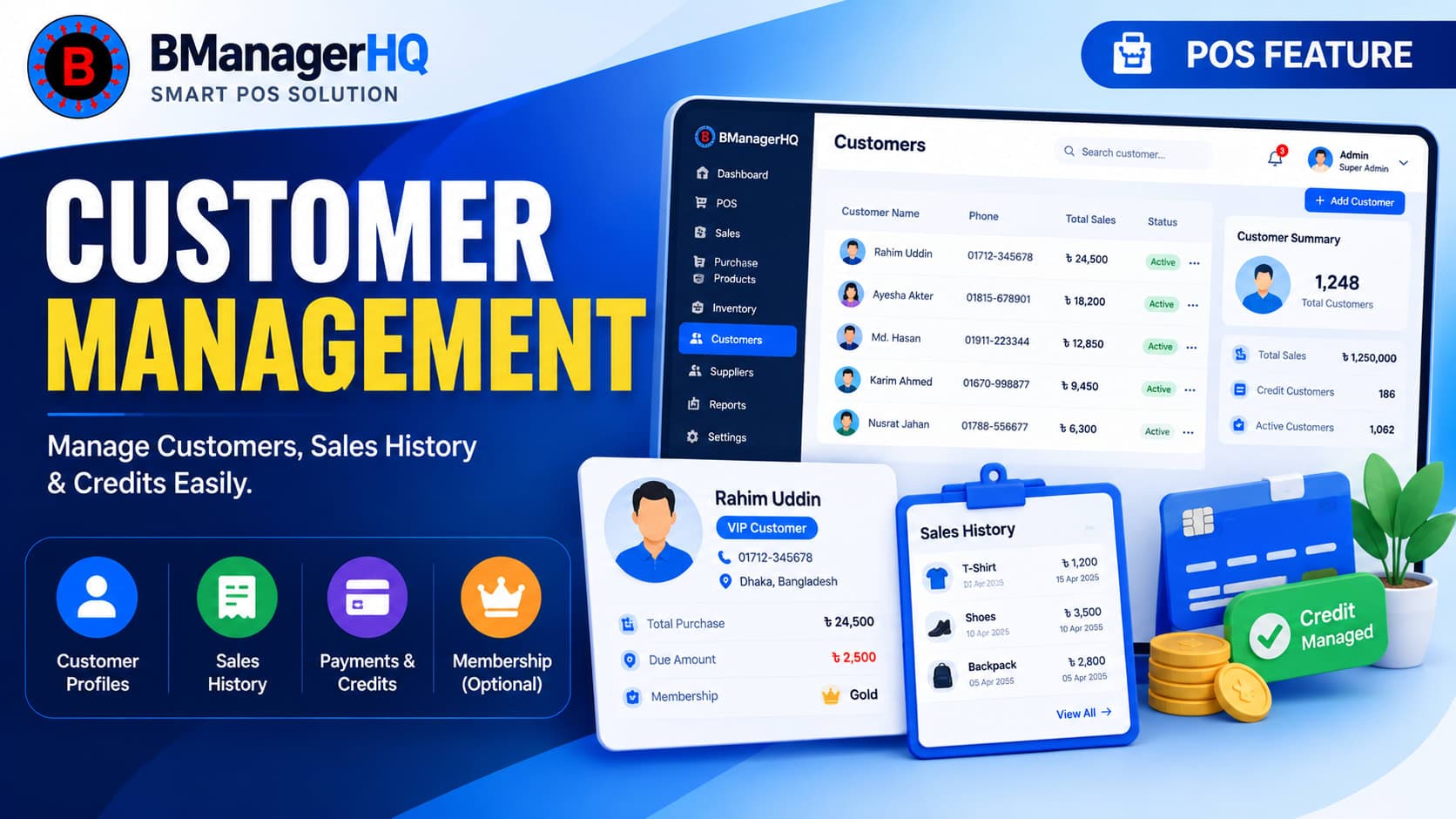
Build stronger customer relationships and keep customer information organized with BManagerHQ Customer Management. Manage customer profiles, sales history, payments, credit transactions, and outstanding balances directly from your POS system.
Instead of keeping customer information in notebooks, spreadsheets, or separate records, BManagerHQ helps businesses connect customer information with their everyday sales and payment activities.
Whether you operate a retail shop, pharmacy, electronics store, grocery business, spare-parts shop, or multiple branches, organized customer management can make it easier to understand your customers and manage their transactions.
What Is Customer Management in POS Software?
Customer management in POS software is the process of maintaining customer information and connecting it with sales, payments, credit transactions, and purchase history.
A basic POS system may only record a sale. A customer-focused POS system can provide a broader view of the customer and their transactions.
With BManagerHQ, businesses can organize customer information and connect it with relevant sales and payment records.
This can help you answer important questions such as:
Who is this customer?
What products have they purchased?
What is their sales history?
How much have they paid?
Do they have an outstanding credit balance?
What transactions are associated with the customer?
Centralize Your Customer Information
BManagerHQ provides a centralized place to manage your customer records. Instead of maintaining customer information separately from your POS transactions, customer data can be connected with the sales workflow.
POS customer tracking
customer payment tracking
customer credit tracking
customer sales history
This makes it easier for your team to find customer information when needed and maintain more organized records as your business grows. For businesses with many regular customers, having a structured customer database can also make daily operations easier.
Connect Customers with Sales Transactions
One of the most useful aspects of POS customer management is connecting a customer with their sales transactions. When a sale is associated with a customer, the business can maintain a clearer record of the customer's transaction history.
For example, if a regular customer purchases several products from your store over time, their transactions can be organized under their customer record.
This provides a better overview than simply having hundreds or thousands of separate sales transactions.
Customer sales history can help businesses understand previous transactions with a particular customer. Depending on the customer's records, your team can review relevant transaction information instead of searching through every sales record manually.
This can be especially useful for businesses with repeat customers.
For example:
Customer: Rahim Uddin
Previous Transactions:
Product purchases
Sales dates
Transaction amounts
Payment information
Outstanding credit, where applicable
Having this information connected to the customer record can make customer service and transaction management more organized.
Customer Payment Tracking
Customer management is not only about storing names and contact information. Businesses also need to keep track of payments associated with customer transactions.
BManagerHQ allows businesses to manage customer payment-related records alongside sales and customer information.
This can help businesses maintain a clearer view of:
Customer sales
Payments received
Credit transactions
Outstanding balances
Previous customer transactions
This is particularly useful for businesses that sell products both for immediate payment and on credit.
Customer Credit & Outstanding Balance Tracking
Many businesses allow trusted customers to purchase products on credit. Without proper records, tracking customer dues can become difficult as the number of credit transactions increases.
BManagerHQ connects customer management with customer credit tracking, helping businesses maintain organized records of customer outstanding balances.
Example
Suppose a customer purchases products worth ৳10,000.
The customer pays ৳6,000 at the time of the transaction.
The remaining ৳4,000 becomes an outstanding amount.
With proper customer credit records, the business can identify the customer's transaction and outstanding balance rather than relying on manual notes. For businesses regularly handling credit sales, this can make customer payment management much easier.
Manage Customers Directly from Your POS Workflow
Customer management should not require a completely separate system. With BManagerHQ, customer information can be used as part of the normal POS workflow.
A typical workflow can look like:
Customer → Sale → Payment → Credit / Outstanding Balance → Transaction History
This keeps customer-related information connected with the business's sales activities.
For a cashier or manager, this can make it easier to identify a customer and process relevant transactions according to the permissions assigned to their role.
Customer Management for Repeat Customers
Customer management becomes increasingly valuable when your business has regular customers. For example, a grocery store may have hundreds of customers who purchase products repeatedly.
An electronics store may need to maintain records for customers who make larger purchases. A spare-parts business may regularly sell products to workshops, technicians, or business customers.
In these situations, maintaining organized customer records can help businesses manage recurring transactions more efficiently.
Customer Management with Membership Cards
Customer management can also work together with Membership Card Management. Businesses that provide membership cards can maintain membership-related customer information alongside their customer records.
This can be useful for businesses that want to identify regular customers and provide membership-based services or benefits.
Customer information can also support customer retention activities. When customer records are connected with sales activity, businesses can use the information as part of their broader customer engagement strategy.
BManagerHQ also provides Loyalty Program Management, allowing businesses to manage customer loyalty activities alongside customer and sales management.
Promotions are another important part of customer engagement. Businesses can combine customer management with Promotion Management to create a more connected sales and customer experience.
For example, a retail business may run product promotions while maintaining customer records and sales transactions in the same POS environment.
For businesses operating multiple shops, branches, or warehouses, customer information can become more difficult to manage as the business expands. BManagerHQ supports a broader multi-location business structure, allowing businesses to manage their operations across multiple locations.
Customer management can therefore work alongside your sales, inventory, and branch operations.
Customer Management can be useful for many types of businesses, including:
Retail Stores
Manage regular customer information and connect customers with sales transactions.
Grocery & Supermarkets
Maintain customer records for repeat customers and manage customer transactions.
Pharmacy Businesses
Organize customer information and connect relevant sales and payment records.
Electronics Stores
Maintain customer transaction history for higher-value product purchases.
Spare Parts Businesses
Keep organized records of customers who regularly purchase different parts.
Wholesale Businesses
Manage customer records and credit-related transactions more systematically.
Multi-Branch Businesses
Maintain customer information as part of a broader multi-location POS operation.
Key Benefits of Customer Management
Centralized Customer Records
Keep customer information organized within your POS environment.
Better Sales History
Connect customers with their relevant sales transactions.
Easier Payment Tracking
Maintain customer payment-related records alongside transactions.
Credit Visibility
Track customer credit transactions and outstanding balances more systematically.
Better Customer Service
Access relevant customer information when serving repeat customers.
Connected POS Workflow
Bring customer information into the normal sales and payment process.
Supports Customer Retention
Combine customer management with memberships, promotions, and loyalty activities.
Suitable for Growing Businesses
Maintain more organized customer records as the number of customers and transactions increases.
How Customer Management Works in BManagerHQ
A typical customer management workflow can be organized as follows:
1. Create Customer Record Add and maintain the customer's relevant information.
2. Select Customer During Sales Associate the customer with a relevant sales transaction when required.
3. Record Payment Maintain payment information connected with the transaction.
4. Track Credit If the sale involves credit, maintain the relevant outstanding amount.
5. Review Customer History Review previous customer transactions and related information when needed.
6. Use Customer Engagement Features Combine customer records with memberships, promotions, and loyalty activities.
This creates a more connected approach to customer and sales management.
Why Choose BManagerHQ for Customer Management?
BManagerHQ is more than a standalone customer database. Customer Management works as part of a broader cloud-based POS and business management system, connecting customer information with sales, payments, products, inventory, cashier operations, reports, memberships, promotions, and loyalty features.
This means businesses can manage customer-related activities without maintaining separate systems for every part of their operation.
Build Stronger Customer Relationships
Manage customer information, purchase history, outstanding balances, and interactions from one organized platform. With BManagerHQ Customer Management, your team can maintain accurate customer records and provide faster, more personalized service across your business locations.
Customer management in POS software allows businesses to maintain customer information and connect it with sales, payments, credit, and other customer-related activities.
Can BManagerHQ track customer credit?
Yes. BManagerHQ supports customer credit tracking as part of its sales and customer credit management functionality.
Can I view a customer's sales history?
Customer-related sales records can be maintained within the POS system, allowing authorized users to review relevant customer transaction information.
Is customer management useful for retail businesses?
Yes. Retail businesses can use customer management to organize customer information and connect customers with sales and payment records.
Can customer management work with membership cards?
Yes. BManagerHQ's customer management functionality can work alongside its Membership Card Management feature.
Can customer management be used with loyalty programs?
Yes. Customer information can be used together with BManagerHQ's Loyalty Program Management functionality.
Is customer management useful for businesses selling on credit?
Yes. It is particularly useful because customer sales, payments, and outstanding credit can be managed together.
Scan product barcodes and create barcodes for products with BManagerHQ POS software. Speed up checkout, identify products quickly, and improve product and inventory management.