Multi-Location Management for POS Software | BManagerHQ
POSfeatures
Multi-Location Management for POS Software
Content type
Features
Topic
POS
Published
14/09/2026
Keywords
Multi-Location Management for POSmulti-location POS softwaremulti-branch POS softwarewarehouse managementPOS shop and branch management software
Managing inventory and sales across multiple business locations can become difficult when every warehouse, shop, or branch operates separately. Business owners need to know where products are available, which location has sold them, how much stock each location holds, and when stock needs to be transferred.
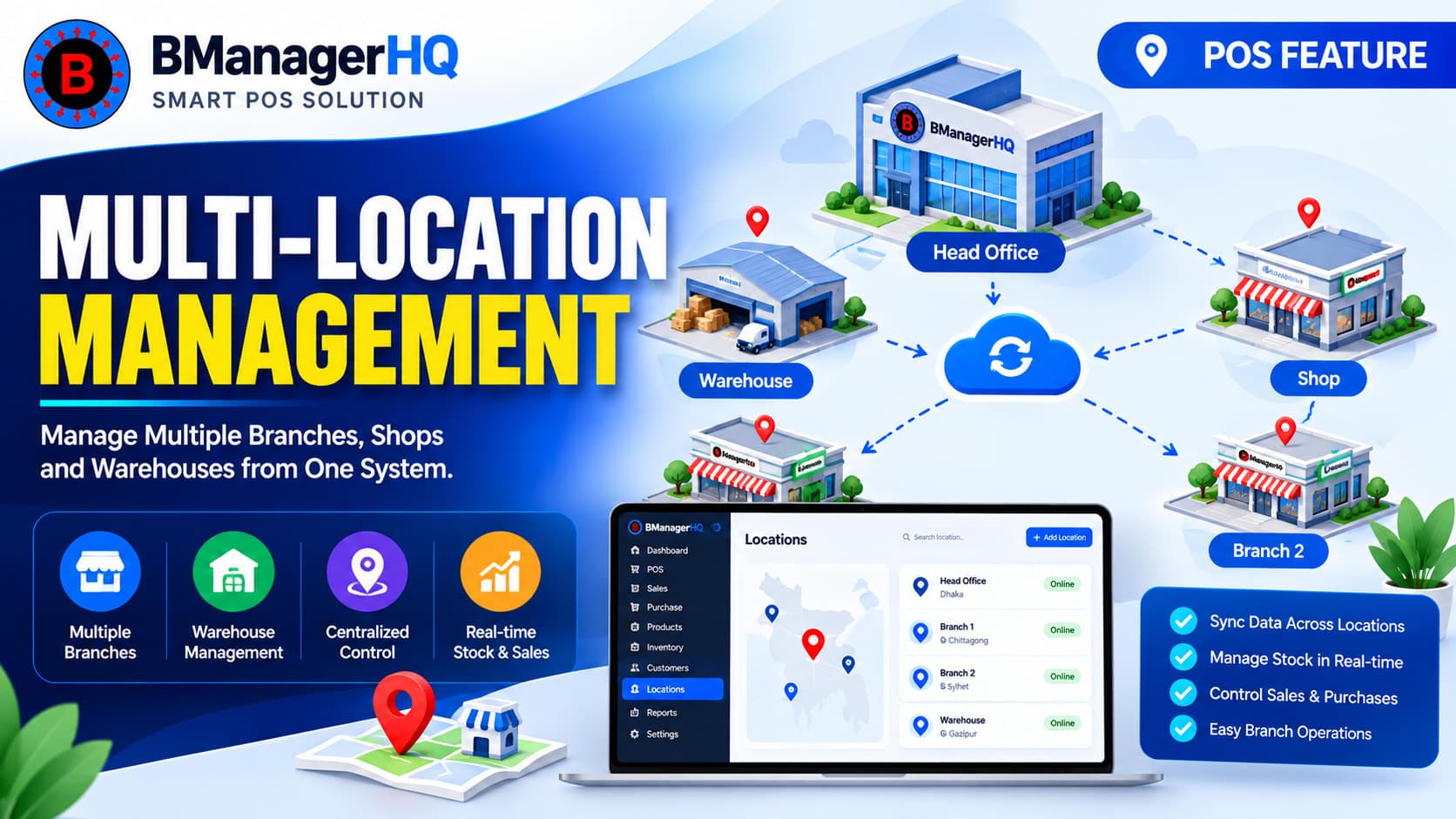
BManagerHQ helps businesses manage multiple warehouses, shops, and branches from a centralized system. Instead of maintaining separate records for each location, businesses can organize their operations within one POS and inventory management platform.
With multi-location management, you can maintain location-based inventory, manage sales activities, monitor stock movement, and transfer products between locations while keeping your business information organized.
What Is Multi-Location Management?
Multi-location management is a feature that allows a business to operate and monitor multiple warehouses, shops, and branches within the same management system.
For example, a retail business may have:
Main Warehouse
Dhaka Branch
Chattogram Branch
Sylhet Branch
Online Order Stock Location
Instead of maintaining completely separate systems for each location, these locations can be managed under one business account. This makes it easier to understand the overall business while still keeping location-specific stock and operational information organized.
Manage Multiple Warehouses, Shops & Branches
Businesses often use different locations for different purposes. A warehouse may primarily store products, while shops and branches may focus on selling products to customers. BManagerHQ allows businesses to maintain these different locations within the same system.
multi-store inventory management
multiple warehouse management
branch inventory management
multi-location inventory software
POS software for multiple branches
You can organize locations according to your business structure, such as:
Warehouse — for storing and managing inventory
Shop — for retail sales
Branch — for operating a separate business location
This structure helps businesses maintain a clearer view of where products and sales activities belong.
Location-Based Inventory Management
When a business has multiple locations, knowing the total stock is not always enough.
For example, suppose your business has 500 units of a product in total:
Main Warehouse — 300 units
Dhaka Shop — 100 units
Sylhet Shop — 50 units
Chattogram Branch — 50 units
The business has 500 units overall, but a customer at the Sylhet location cannot necessarily sell products sitting in the Dhaka shop. That is why location-based stock management is important.
BManagerHQ helps businesses keep track of inventory according to its respective location, making it easier to understand where available stock is actually located.
Manage Sales at Different Locations
Each shop or branch can operate as its own business location while remaining connected to the organization's overall system.
For example, when a sale is made at a particular branch, the transaction can be associated with that location.
This gives the business a clearer picture of:
Sales by location
Stock associated with each location
Product availability
Business activity across branches
Instead of combining every transaction into one general record, location-based information can help management understand how different parts of the business are operating.
Centralized Business Management
One of the major advantages of multi-location management is having a centralized management environment. A business owner or authorized manager does not need to maintain completely separate systems for every shop.
The organization can manage its locations from one platform while keeping location-specific information organized.
This is particularly useful for businesses that are expanding from one location into multiple shops or branches.
Stock Transfer Between Locations
Having multiple locations also creates the need to move products between them.
For example:
A branch has high demand for a particular product, but its available stock is low. Another warehouse has sufficient stock. In this situation, the business may need to transfer products from the warehouse to the branch.
BManagerHQ supports stock transfer between warehouses, shops, and branches, helping businesses keep track of inventory movement between locations.
Without centralized location management, businesses may have difficulty answering basic questions such as:
Which branch has this product?
How much stock is available at each location?
Which warehouse currently holds the product?
Which shop needs additional stock?
Where did a particular sale take place?
How much inventory is distributed across the business?
A centralized multi-location structure makes this information easier to organize and manage.
Multi-Location Management for Growing Businesses
A business does not need dozens of branches to benefit from multi-location management.
Even a business with:
One warehouse + two shops
Two branches
One central warehouse + multiple retail outlets
Several shops in different areas
can benefit from maintaining its locations within a single system. As the business grows, adding locations to the management structure can be more practical than creating completely separate systems for every new branch.
Example: Retail Business With Multiple Shops
Consider a clothing business operating three shops and one central warehouse.
Locations
Main Warehouse
Stores incoming products
Maintains reserve inventory
Dhaka Shop
Handles customer sales
Maintains shop-level inventory
Sylhet Shop
Handles local customer sales
Requires regular stock replenishment
Chattogram Shop
Maintains its own product inventory
When the Sylhet Shop needs additional stock, products can be transferred from the main warehouse or another suitable location. The business can therefore maintain a connected inventory structure instead of managing each shop independently.
Multi-Location Management With Product Variants
Multi-location businesses often need to manage different variants of the same product.
For example, a clothing business may sell:
Polo Shirt
Black — M
Black — L
Black — XL
White — M
White — L
White — XL
These variants may not be available in equal quantities at every location. One branch may have more Large sizes, while another may have more Medium sizes.
Combining Product & Variant Management with multi-location inventory allows businesses to maintain a more organized product structure.
Businesses with warehouses may need more detailed stock organization than simply knowing which warehouse contains a product. For example, products may be organized into different bins or storage positions inside a warehouse.
BManagerHQ's Bin-Level Inventory Management can complement the multi-location structure by providing more detailed inventory organization.
Multi-location management can be useful for many types of businesses.
Retail Businesses
Businesses operating multiple retail shops can manage their locations and inventory from one system.
Wholesale Businesses
Wholesale businesses can maintain warehouse locations while tracking product movement and sales activities.
Clothing Businesses
Multiple clothing outlets can manage product variants and stock across different branches.
Electronics & Mobile Accessories
Businesses with several outlets can monitor product availability across locations.
Grocery Businesses
Multiple grocery stores can maintain location-specific inventory and sales records.
Pharmacy Businesses
Pharmacies operating multiple branches can organize products and stock according to each location.
Spare Parts Businesses
Businesses maintaining large inventories across warehouses and shops can use location-based inventory management to organize stock.
Key Benefits of Multi-Location Management
Centralized Management
Manage multiple warehouses, shops, and branches within one business system.
Location-Based Stock Visibility
Understand where products and inventory are located instead of looking only at overall stock.
Easier Stock Transfers
Move products between locations while maintaining organized stock movement records.
Better Business Organization
Keep warehouse, shop, and branch operations structured under the same organization.
Support Business Expansion
Add new business locations without needing to maintain an entirely separate management system for every location.
Better Operational Decisions
Location-specific information can help management identify where inventory is available and where additional stock may be required.
How Multi-Location Management Works
A typical workflow can be structured like this:
1. Create Locations
Set up your warehouses, shops, and branches within the organization.
↓
2. Organize Products
Maintain your product catalog and variants.
↓
3. Manage Location Stock
Track inventory according to its respective location.
↓
4. Process Sales
Record sales at the appropriate shop or branch.
↓
5. Monitor Inventory
Review stock availability across locations.
↓
6. Transfer Stock When Required
Move products between warehouses, shops, or branches.
This creates a connected structure between products, inventory, sales, and business locations.
Why Use BManagerHQ for Multi-Location Management?
BManagerHQ combines POS, inventory, sales, purchasing, customer, supplier, and location management into one business management platform. For businesses operating multiple locations, this means you can build a connected management system instead of relying on separate records for every shop or warehouse.
Multi-location management also works alongside other BManagerHQ features such as:
Product & Variant Management
Bin-Level Inventory Management
Stock Transfer Between Locations
Purchase & Supplier Credit Tracking
Sales & Customer Credit Tracking
Low Stock Alerts
Cashier Drawer & Session Tracking
Sales, Stock & Cashier Reports
Barcode Scanning & Generation
Key Multi-Location Capabilities
With BManagerHQ, businesses can organize:
Multiple warehouses
Multiple shops
Multiple branches
Location-based inventory
Location-based sales operations
Stock transfers between locations
Product availability by location
Product variants across locations
Warehouse and shop operations
Centralized business management
Manage Multiple Business Locations From One System
As your business expands, managing every location separately can make inventory and operational management increasingly difficult. BManagerHQ provides a centralized approach for managing warehouses, shops, and branches, while maintaining visibility into location-specific inventory and business activity.
Whether you operate two shops or multiple branches with a central warehouse, a structured multi-location system can help keep your business operations organized.
Explore BManagerHQ Point of Sale (POS) Features and see how multi-location management works together with inventory, sales, purchasing, cashier operations, and reporting.
Multi-Location Management for POS Software FAQs
What is multi-location management in POS software?
Multi-location management allows a business to manage multiple warehouses, shops, or branches within the same POS and inventory management system while keeping location-specific information organized.
Can I manage multiple shops with BManagerHQ?
Yes. BManagerHQ is designed to support businesses managing multiple warehouses, shops, and branches within their organization.
Can inventory be managed separately for each branch?
BManagerHQ supports organizing inventory according to business locations, helping businesses understand stock availability at different warehouses, shops, and branches.
Can I transfer stock between branches?
Yes. BManagerHQ includes Stock Transfer Between Locations, allowing businesses to manage product movement between warehouses, shops, and branches.
Is multi-location management useful for small businesses?
Yes. Even businesses with only a few locations can benefit from centralized management and location-based inventory organization.
Can I manage warehouses and shops together?
Yes. A business can organize different types of locations, including warehouses, shops, and branches, within its business management structure.
Transfer stock between warehouses, shops, and branches with BManagerHQ. Manage inter-location inventory movement and maintain organized stock records across your business.